Sunday, April 10, 2011

Part A - Brainstorm


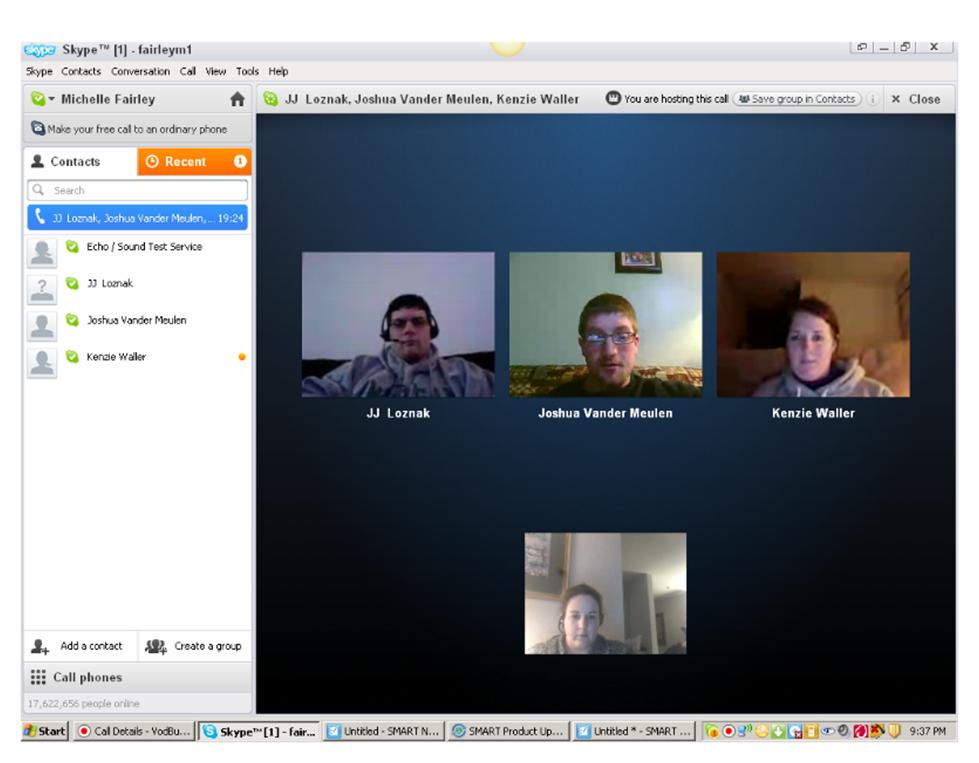
Because of time and familiarity, my group chose to use Skype.  During the session we decided that we would look for applications to improve our different areas of teaching.  For instance, I will be looking up applications to enhance the science curriculum; someone else will focus on English, another math and social studies.  Currently, we are in the process of discussing how we are going to put our project together.  Our first thought was Google docs but because there is nowhere to include audio, we are looking at PowerPoint or Keynote.  We are however using Google docs to setup a timeline and as a discussion forum.  This helps for us to leave messages without having to meet every time.  As of right now we are in the process of researching and plan on meeting on Tuesday.

By using Skype, we did not have to worry about learning how to use it before we all met.  It gave us more time to focus on our project.  I also thought the setup of seeing everyone's face was nice because I felt like they were sitting on the couch with me.  It helped to create a more comfortable feeling which was nice because it was the first time I had met any of them face to face.  I would however like to use another web-conferencing tool next time.

There were a few disadvantages to using Skype.  The first was that we were trying to look at our screens to see the assignment and talk at the same time.  It would have been nice to have one person share their screen and then we could have all discussed what we needed to do.  I would have also liked for someone to be the leader and create polls so we could make quicker decisions.  Most decisions were made after someone made a comment and we all said, "Sure that will work."  By having a poll, I felt like we could have voted anonymously to make a more sound decision.   Overall, I did like Skype for the first meeting because it was more about brainstorming but I feel we will need something more formal next time.


Saturday, April 9, 2011

WPP Part B

1. What is the TP knowledge for the solution?  (i.e., how does the technology you have chosen support the teaching strategies and methods you have chosen?)

I know that feedback if done right can be essential to students’ progress. I have experienced this in my class first hand when going over the homework from the night before.  By doing this, most students get a better understanding of what it is I want them to know.  Classmarker.com allows for students to get the information of what they missed while it is still fresh in their head. Studies show that students retain information better when they are excited and I believe that we are most excited right before the quiz is handed out and when we hand the quiz back in. Because their adrenaline is still running from them completing the quiz, students are more likely to remember the feedback given to them.  Another essential to feedback is making it relevant.  With Classmarker.com, I can post answers with explanation of why the correct answer is the best choice.  It also allows for me to answer any clarifying questions that may still arise.  Lastly, it is essential that I get feedback so I know what it is I need to change or re-teach.  By using this program, I can quickly see the data of questions missed and overall scores.  This allows for me to make modifications in my teaching to better reach my students which hopefully will raise their scores.  

2. What is the TC knowledge for the solution? (i.e., how specifically does this technology make the content in your problem more intellectually accessible?  Be sure to think about representation.)

I want for my students to do better on their quizzes and unit test.  With Classmarker.com my students will have access to technology that can help them do this.  Students will not only get feedback on their answers, but they will be able to see their progress from quiz to quiz, which will give them a better understanding why their grade it what it is. Students can also see what quizzes they did poorly on and know what part of the unit they need to study the most.  Parents are also a factor in a child’s education and they too can have access to the quizzes and their child’s scores.  By posting a parent quiz that can be done multiple times, parents can experience the quiz and then take the opportunity to review the answers with their child.   Because there are other teachers who help students with special needs, it is crucial that they have access to the quiz.  Their access can help to determine what supports are needed to help out the child.  Overall, using this program will allow for multiple stakeholders to have access to the assessments so more supports can be put into place which will result in better assessment scores.  

3. What is the PC knowledge for the solution? (i.e., how specifically do your pedagogical choices make the content in your problem more intellectually accessible? Be sure to think about how the student will experience the content given these instructional strategies.

Because I feel that I am missing a crucial part of my teaching by not providing adequate feedback in a timely manner, students' assessment scores are not a high as they could be.  By incorporating an online test that provides quick and essential feedback, I am able to embed a crucial element of a good teaching practices. My students will have access to information that is directed directly at them so it becomes important.  By it being directed at them, they do not have to wait to get the information for the questions they missed. They also have the ability to retake quizzes so they can reassess to see if they have mastered a concept the second time before moving onto the unit test.  Having this access to feedback can provide better one on one help because this time is spent directly on the parts of the concept they missed and not the entire concept.  Each child will receive feedback because each child will take the quiz, how they use the feedback to improve their score is up to them but the possibilities are endless.

Web-Conferencing


As I looked through the different video conferencing, I found Vyew to be interesting and would like to try this with my next group discussion.  We used Skype with our last video conferencing but we are planning on trying something new next time.  I have however used Adobe outside of class and enjoyed it.  Instead of having all the middle school science department chairs meet at one building each month, we are web-conferencing.  So far it has been great because I can login at school or at home.  We do surveys about how the new curriculum is going or if there is a need for something.  The one thing I would change is that I would like to have more people use a camera so we can see each other.  As a new person to this group it is nice to get to know people's faces.  Adobe was also going to be my web-conferencing tools of choice for a guest speaker from the National Institute of Health, but something happen and he was called to take a trip out of the country.   I do plan to use Adobe for my next guest speaker because it opens up the possibilities of who can come into your room. 

Saturday, April 2, 2011

WPP Part A

1. My problem is that my test scores are in the middle of all the middle schools in the district and I want to improve them. I want to address the issue of not having enough time to provide students with the proper feedback on test and quizzes because I believe this will help with the fix the problem.  The curriculum has one day throughout each quarter for makeup day but the curriculum does not include review days or days for assessments.

2.  My plan is to find a program that will allow my students to take an assessment and at the end of the assessment they can see what questions they missed.  Along with this, I would also like the ability to give students feedback.  For instance, any questions they missed not only had the correct answer but it would also explain why answer is correct. My backup plan would be to create a recording that goes over the quiz.  This would happen if the program did not work or if it cost too much money.  I have never heard of someone doing anything to solve this problem, I just know that they either sacrifice time in another lesson or they just decide to not go over the test like I do.  


3.  The plan is to implement this with my eighth graders.  Right now they are taking a course for high school credit and they have to be prepared for the final exam.  Without us going over the quiz together, the students will not know why they missed what they which could cause them to fail the final.  My experimental group would be about sixty students in an earth, space systems class.  To start this off, I would like to implement a few small quizzes, have them retake them and then move onto bigger quizzes and possibly the unit test. 

4a. According to Tom Woisly's article, How Do Teachers Provide Feedback, the best time to provide feedback is when a student is engaged in a task.  This means that I will need a website that can provide immediate feed to the students when the test is over.  The article also goes on to say that all students need feedback, not the ones who are struggling.  This should not be problem, because all students will take the quizzes so everyone should get the feedback they need.  According to Fred Jones, teachers should praise, prompt and leave when giving feedback.  I will have make sure that I somehow I see their scores, praise them, find out what they need help with and then leave so I may have this interaction with other students.  In order to do this I will need a program that will have some type of message at the end to tell them how they did on their assessment.  Most articles talked about feedback as a way to tell students what they need to improve upon.  With this being said, I will need a program that does not just give the correct answers but will also allow for students to see the areas they are a missing.  After looking at what feedback is, I know that I am going to have to have a program that provide feedback that is quick, meaningful, positive, and for all students.  


4b. As I searched for a program that would offer everything I needed to provide my students with appropriate feedback, I stumbled upon http://www.classmarker.com/.  It is a free website that allows for you to create multiple types of quizzes.  Teachers can put in feedback at the end that can tell students the correct answers or they can place a little explanation of why each answer is correct.  There is a section to create a class and import the class roster so that each child has their own password which allows for them to take their own test and see their results along with the results from previous quizzes.  Quizzes can have time limits and limits for the amount of times a student make take the quiz.  At the end there is a place to put a comment if a student gets a certain score or higher and one that may explain to the child the need to retake the quiz.  Even though it is free, a person may upgrade for a $25 fee.  Another website that is also available is Google forms which can provide a lot the same resources but it was not as user friendly. 

When I Google searched classmarker.com, it was one of the first few websites that came up but now when I go back, I am having a difficultly finding it.  Many of the websites want to provide me with different assessment tools or ideas, not a program that can give quick feedback after a quiz.  After many Google searches I found that the best way to find programs is to type in “test and quiz makers.”  

5.  In order to test to see if this works with my students, I am going to give a quiz on different types of rocks and see what their scores are.  I am then going to ask that they redo the quiz a few days later to see if their score increase.  My goal is to have everyone pass the test with a 60% or higher which can be a challenge for some of my lower level students.  The ultimate test will come when they take their unit.  If I get a passing rate of 70% of my students, then I will know that this is something that worked.  


 Try it out 
http://www.classmarker.com/

Thursday, March 24, 2011

About Me

Here is a video about me and what I want to learn about technology.

Wednesday, March 23, 2011

Funny Tech Story

I created this using garage band but converted it into an MP3 before I saved it.  Hope you enjoy.  

Here is my funny tech story

Wednesday, March 9, 2011

Final Reflection

  1. What are some things that you have learned about effective teaching strategies when integrating technology?
The first idea that I am taking away from this class is the universal design for learning.  It put into perspective all the different learners I have and the thought it takes to reach each one of them.  I now look at my lessons and try to figure out how to implement different strategies so I can reach more types of learners.  Instructional design principles has taught me how to setup my lessons.  The one area that I keep using is, starting with the problem or the need.  By beginning this way, I can better relate the lesson to my students.  I used try create a lesson and then try to figure out how I was going to relate it to a real world situation.  Now, I create lessons and use relevance with ease.  Evaluating web-based technologies is also something that I am concentrating on now because I know that putting a computer in front of students is not always interactive or effective.  I feel that not only has my knowledge on how to use technology gotten better but so have my everyday lesson planning. 
  1. How did integrating web-based technologies help you think about and evaluate uses of technology?
I really enjoyed looking at these because I think that many times people who write curriculum think that because students used some type of electronic, it is incorporating technology.  After looking at the web quest, I can see just how interactive a website can be and how that translates into students learning.  It also helped me to explore new things on my own and caused me to try to create lessons that I would have never thought of.  I also am sharing of these ideas with my colleagues so they can see what good use of technology is and how easy it is to develop your own interactive lessons. 
  1. How have you met your own personal goals for learning about technology integration?
I surpassed my own expectations.  If you were to tell me that I would be creating a PowerPoint presentation explaining how to find the epicenter and it was interactive, I would have not believed it.  I found my self frustrated with my students the other day because they did not know how use a certain technology.  It hit me that I was becoming so fluent with technology that I was surpassing my students, something that I could have not said a year ago.  Both the PowerPoint presentation and the web-design were the two assignments that surprised me and my ability to really be ahead of the competition.  Even though I have completed these two assignments, I know that there is so much more to learn about these and will try to become an expert during the summer. 
  1. Do you have any new goals? What are your plans for reaching your new goals and your long-term goals after this course is over?
My goal is to become better at PowerPoint and web-design so that I can have more interactive lessons in my classroom.  I plan on sitting down this summer when I have a little more free time, and just read and experiment with all the different possibilities each one has to offer.  I understand that I have only broken the surface and there is still much more I can learn.  As I do this, I want to start creating lessons that I can use for the following year.  This way I will have the materials ready to go for the new school year because otherwise it will not get done.